BotsOnDeck

You bring SuperGrok. We give it a job and a WordPress plugin.

Your Grok Bot writes local articles, with pictures, straight into your WordPress as drafts. You approve from your phone, or, with Pro, turn on automatic approval after the draft passes review.

Get the free plugin See Pro · $29/month

Free plugin, no cardPro adds the AI crewSuperGrok is yours, billed by xAI

Interactive exampleNothing publishes

Demo
Trade
yourshop.example Pro

Drafts

Written by your Grok Bot. Nothing publishes until you approve.

    Furnace and Heat Pump Tune-Up in Kirkland: What a Fall Visit Covers

    Book in October. Here is what the visit covers, and what it does not.

    No credit line on this draft.

    The free plugin ends every draft with "Drafted with BotsOnDeck." linked to botsondeck.com. Pro leaves it off new drafts. This is a Pro draft.

    Your approval

    You choose how articles go live.

    • Review every draft yourself. It lands on hold in your WordPress; approve it from your phone or send it back with a note. The default, Free and Pro.
    • Or, with Pro, let the check approve for you. A draft that passes goes live after a hold window you set. An edit or a send-back puts it back on hold for a fresh check.

    Pick a setting and watch what happens to a checked draft. Illustration

    1. Checked2 notes, passed
    2. Waiting for your approvalOn hold in WordPress

    Default, Free and Pro. Nothing goes live until you approve it.

    Automatic approval is a Pro option. Pro

    The learning loop

    Your AI crew remembers your corrections.

    Send back a still with a reason, and your shop keeps the correction. One example, Pix, as an illustration. Step through it:

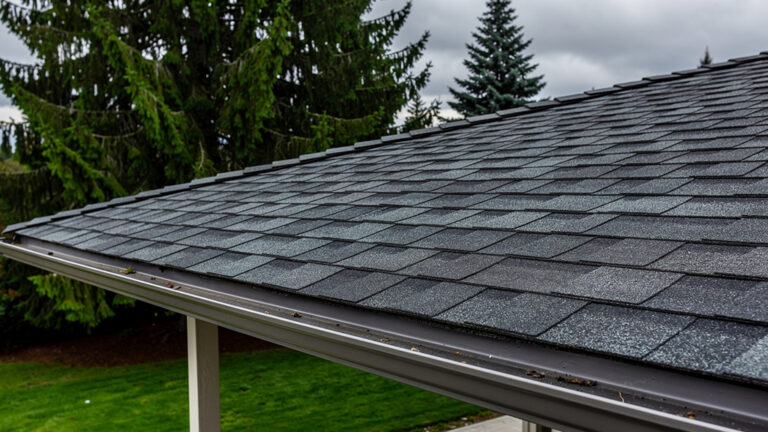
    A demo still of a house eave with a gutter, used as the sent-back example

    Sent backA gutter drawn along the sloped edge of the roof. Real gutters hang on the eave, the low edge, where water runs off.Reason picked: roof or gutter in the wrong place. Note: "gutter on the rake." That is the whole send-back; no essay needed.

    Learned rulesSettings

    • PixGutters on eaves only, not on a rake.From 2 send-backs with this reason

    A rule appears after the same reason holds up more than once, not after one send-back. Every rule can be read or cleared in Settings, and Clear asks once.

    Rules come from your send-backs, edits, and approvals, and live with your license and your site. Pro. How each bot learns.

    The AI crew

    Six jobs. One draft, ready for you.

    Six AI bots that research, write, check, and prepare your WordPress articles. One job each, and the crew comes with Pro. Here is who did what on the example draft; pick a face to see one piece of its work.

    Meet the AI crew →

    Any local business. Tell us your trade.

    A trade pack points the same six at your line of work: the topics customers ask about, the season they book in, and the checks that fit the job. If there is a pack for what you do, you can see a draft for it above. If there is not, the crew builds the job from your own site.

    Prepared for search and AI answers

    Written for the search bar, and for the answer.

    People still type into Google. More and more, they ask an AI and take the answer it gives. Every draft is prepared for both.

    • For search: one clear title, headings that match the question, your city in the words that count, a relevant image with descriptive alt text.
    • For AI answers: a short plain answer near the top, a FAQ marked up as questions and answers, claims that carry a source.

    Northline Heatingnorthlineheating.example

    Furnace and Heat Pump Tune-Up in Kirkland: What a Fall Visit Covers

    A furnace tune-up is a once-a-year visit where a technician cleans the burners, checks the heat exchanger for cracks, tests the safety switches ...

    People also ask

    Do I need a tune-up if the furnace is new?

    Does a tune-up include a new filter?

    Source in the article: your service page, linked where the visit length is stated.

    Search result, as an illustration. Preparation, not a promise of rank.

    Free and Pro

    One plugin.
    Two tiers.

    Start with Free. Add Pro when you want the AI crew.

    Free

    $0No card required

    Receive drafts from your own SuperGrok in WordPress.

    • Review and publish them yourself. Nothing goes live until you do.
    • Includes the "Drafted with BotsOnDeck." credit line on each article.
    • Your articles and pictures stay when you leave.

    Get the free plugin →

    Pro

    Everything in Free, plus the AI crew.

    $29per site, per month

    $290 a yearSave $58 if you pay yearly

    Cancel any time; your articles and pictures stay.

    • The AI crew. Six jobs for your SuperGrok, one for each part of the work
    • The check before you read. Claims, numbers, and reading level, flagged with sources
    • Four stills per draft. Your own photos first; demo stills labeled until you swap them
    • Automatic approval. A draft that passes the check goes live after a hold window you set
    • The learning loop. Learns your preferences from your send-backs, edits, and approvals; rules you can read and clear in Settings
    • Search-ready structure. Structured data, a FAQ block, and internal links on every article
    • The record. Who approved what, and when, plus the list of what is waiting on you
    • No per-article charge. Your Grok does the writing; the price is the price

    Get the free plugin

    Install Free, then activate Pro in Settings. Meet the AI crew.

    Questions people ask

    The short answers.

    More answers, including what the crew learns and how the pictures work, on the plugin page and the crew page.

    Is the plugin really free?

    Yes. Free is not a trial and does not expire. Your SuperGrok writes, the plugin parks the draft in your WordPress, you hit Publish. The only thing Free adds to your site is the "Drafted with BotsOnDeck." line at the end of each article.

    What do I need to bring?

    A WordPress site you already run and a SuperGrok plan from xAI. That bill is between you and xAI; we do not resell it, mark it up, or hold your keys. Here is the bill to expect.

    Why do I have to bring my own SuperGrok?

    Because it makes the deal better for you. Your AI crew uses your own SuperGrok account and allowance, so Pro has no per-article charge, no customer's job runs through an account of ours, and we do not resell a model with a markup. Pro is what the plugin adds: the AI crew, the learning loop, automatic approval, and the WordPress workflow.

    Can it publish without me?

    Only if you turn that on, and only with Pro. By default every draft stops at you. With automatic approval on, a draft that passes the check goes live after a hold window you set, and any edit or send-back puts it back on hold for a fresh check.

    What happens to my articles if I cancel Pro?

    They stay. Every article and picture is in your WordPress, and we never rewrite a published post. New drafts go back to the free plugin's behavior, credit line included. Your learned rules stay exportable for 90 days after Pro ends, in case you come back; after that we delete them.

    How much is Pro?

    $29 a month per site, or $290 a year, which saves $58. No per-article, per-word, or per-image charges. SuperGrok is separate and billed by xAI. The plugin itself stays free.

    Contact

    Talk to a person.

    Rob Harris

    Rob Harris

    Founder, BotsOnDeck. Seattle area.

    Questions before you start, a trade not on the list, something that went wrong? Send me a note.

    Prefer your own mail app? hello@botsondeck.com. Replies come during the day, Pacific time.

    Goes to a person, not a queue. We keep your message to answer it and nothing else.

    You know your trade.Your AI crew helps put it into words.

    The plugin

    Free. Yours. Controlled by you.

    Install it on the WordPress you already have. If you ever leave, uninstall it and everything stays.

    Get the free pluginWhat SuperGrok is

    1. 1
      Have the two accounts. A WordPress site you run, and a SuperGrok plan from xAI.
    2. 2
      Install the plugin. In wp-admin: Plugins, Add New, search BotsOnDeck, or upload the zip.
    3. 3
      Connect it in Settings. Link your SuperGrok from the plugin's Settings page. Drafts start parking after that.
    4. 4
      Review the first draft. From the editor or your phone. Pro is a switch in the same Settings when you want the crew.